Launching agentic and other robust workflows on Gumloop
Gumloop is an AI-driven automation platform that lets users create workflows without code. Compared to n8n, which is code-first and source-available, Gumloop targets non-technical users with a more limited feature set. As a result, Gumloop benefits from an unconstrained platform like Credal to handle open-ended tasks, such as assessing applicants based on multiple variables or evaluating customer churn risk based on recent interactions. In this article, we’ll discuss these challenges and how platforms like Credal can extend Gumloop’s capabilities.
What is Gumloop?
Gumloop is a no-code workflow automation platform that allows users to drag-and-drop pre-built components into automated workflows via its canvas interface. For instance, a user could create an automation that checks incoming emails with AI for potential leads and then updates the CRM accordingly.
Gumloop is a recent addition to the workflow automation market, joining Zapier, Make, n8n, and Credal. This space is split in two main lines: AI-powered versus human-designed solutions and technical versus non-technical audiences.
Gumloop is the AI-powered platform designed for non-technical users.
In contrast to n8n, Gumloop is intended for all users, eliminating the need for engineering bandwidth. According to the company, their aim is to provide infrastructure that “operate at 10x the speed of writing, testing, and productionizing code”.
That doesn’t mean Gumloop is only for non-engineers. Engineers can still build workflows, call them programmatically, and feed the results into code. This is especially useful when non-technical users need to observe or manage processes. Consider a lending company that might want to use Gumloop to score an applicant, where the risk team might want to experiment with the parameters.
What are popular use cases of Gumloop?
Gumloop is commonly used for:
- Automating routine business processes: Gumloop can automate reptitive tasks, such as sorting inbound emails, classifying them using AI, and routing them to the right person or team in a CRM.
- Lead generation and management: Gumloop can find potential leads by scanning incoming messages, enriching the lead data with AI, and integrating it directly into the sales process for timely follow-up.
- Customer support automation: Gumloop can build workflows to manage customer inquiries by integrating with ticketing systems, sending automated responses, and passing on complex cases to human agents as needed.
These scenarios work because they rely on straightforward logic: retrieve record X, navigate a decision tree based on X, and then generate a result. Although this may appear to be a flexible system, it’s actually rather restricted; modern workflows move beyond rigid, hard-coded rules.
What nodes do Gumloop support?
Gumloop offers a wide variety of node types: logic nodes, AI nodes (OCR or traditional prompting), and nodes for specific, integrated applications. To illustrate the range of Gumloop nodes, let’s take a look at a few:
- Webhook Trigger: This node activates a workflow whenever an external event occurs, like a form submission or API request.
- API Request: This node sends or gets data from any REST or GraphQL API directly within your flow.
- Text Parser: This node pulls structured data (like emails, order IDs, or keywords) from unstructured text.
- Database Query: This node reads from or write to databases including Postgres, MySQL, or Airtable.
- Conditional Logic: This node branches workflows based on rules, filters, or evaluated conditions.
- Loop / Iterator: This node repeats the same step for each item in a list, such as iterating over rows in a spreadsheet.
- File Handling: This node uploads, downloads, or transform files like CSV, JSON, or PDFs.
- LLM Call: This node generates or summarizes content using GPT models, with custom prompts.
- Notification: This node sends messages via email, Slack, or other channels when specific conditions are met.
- Scheduler: This node triggers workflows at set intervals (hourly, daily, weekly) without external input.
Gumloop nodes essentially act as individual programming functions, breaking workflows into small, editable steps for non-technical users.
Why is Gumloop’s design limited?
While Gumloop makes no-code automation accessible, it has its limits. The platform is basically a toolbox of logic components (if-else, for, .map(), etc.) which can handle predictable, step-by-step workflows. But it struggles with tracking state or non-deterministic workflows because every step in Gumloop must be spelled out in detail (e.g. “Split string into array, parse array for matches to HR employee list, generate new compliance record, make API request to XYZ endpoint”). This means tasks that are more open-ended, such as “Find employee matches and create corresponding compliance records,” need to be handled by AI agents.
This raises an important question: are Gumloop workflows inherently restricted to narrowly-defined tasks due to its no-code approach, or is there a way for them to tackle more complex problems? The answer lies in Gumloop’s design rather than a workaround. As a workflow platform, it can invoke external services, including managed AI agent platforms. This allows users to rely on Gumloop for deterministic, step-by-step workflows while leveraging platforms like Credal to handle non-deterministic, reasoning-based tasks.
Credal is the non-deterministic counterpart to Gumloop’s deterministic design
Credal is a managed AI agent platform built to address the inherent challenge of traditional workflow automation: handling reasoning at scale. Solutions like Gumloop shine at managing predictable action sequences, but struggle with open-ended tasks that need contextual judgement, information from multiple sources, or dynamic decision-making.
Credal functions as an intelligent reasoning layer accessible that external systems can tap into via APIs. Traditional workflow platforms force users to map out every possible scenario, but Credal’s agents can handle vague situations by utilizing enterprise data, outside knowledge, and sophisticated reasoning. Credal also simplifies the challenges of model selection, prompt engineering, and context management, removing the overhead of extensive engineering effort.
Credal’s native integrations with services like Google Drive, Notion, Slack, Salesforce, and dozens of other enterprise tools through pre-configured, permission-aware connectors makes it stand out in the enterprise AI market. Credal eliminates the need for custom API development, a major bottleneck in other platforms, by managing authentication, data formatting, and enterprise security protocols.
The platform also excels in handling non-deterministic workflows. Instead of forcing users to predict every outcome of an explicit decision tree, Credal agents adjust their strategy based on their current context. For example, an agent assigned to “assess a customer’s churn risk” could analyze recent support tickets, usage trends, billing history, and competitive data to dynamically prioritize the most relevant factors in the present instead of following a fixed scoring system.
What real world scenarios would require Gumloop to integrate with Credal?
Here are some practical examples where Credal would be an ideal external integration for a Gumloop workflow:
- Candidate Evaluation for Hiring: Gumloop takes care of the structured workflow elements, like collecting applications, extracting candidate details through OCR, and filtering based on basic qualification checks. Credal then takes over for more nuanced reasoning, evaluating leadership potential, cultural alignment, and technicl skills by assessing resumes and cover letters while referencing company values across multiple data sources.
- Customer Churn Risk Assessment: Gumloop tracks customer accounts and flags upcoming renewals with deterministic workflows. Credal then conducts a sophisticated assessment of churn risk, analyzing recent support tickets, usage metrics, billing history, and market data to dynamically decide which elements are most influential rather than using a static scoring formula.
- Content Moderation: Gumloop identifies potentially problematic content using deterministic filters based on keywords or image characteristics. Credal then performs deeper evaluation on the initially flagged content, taking into account context, intent, and unusual scenarios to help reduce false positives that rules alone can’t address.
How would a platform like Gumloop work with Credal?
Gumloop can send API requests to other systems. This means a workflow step needing advanced reasoning can invoke Credal and wait for its response. Here’s a clear example to demonstrate how it works:
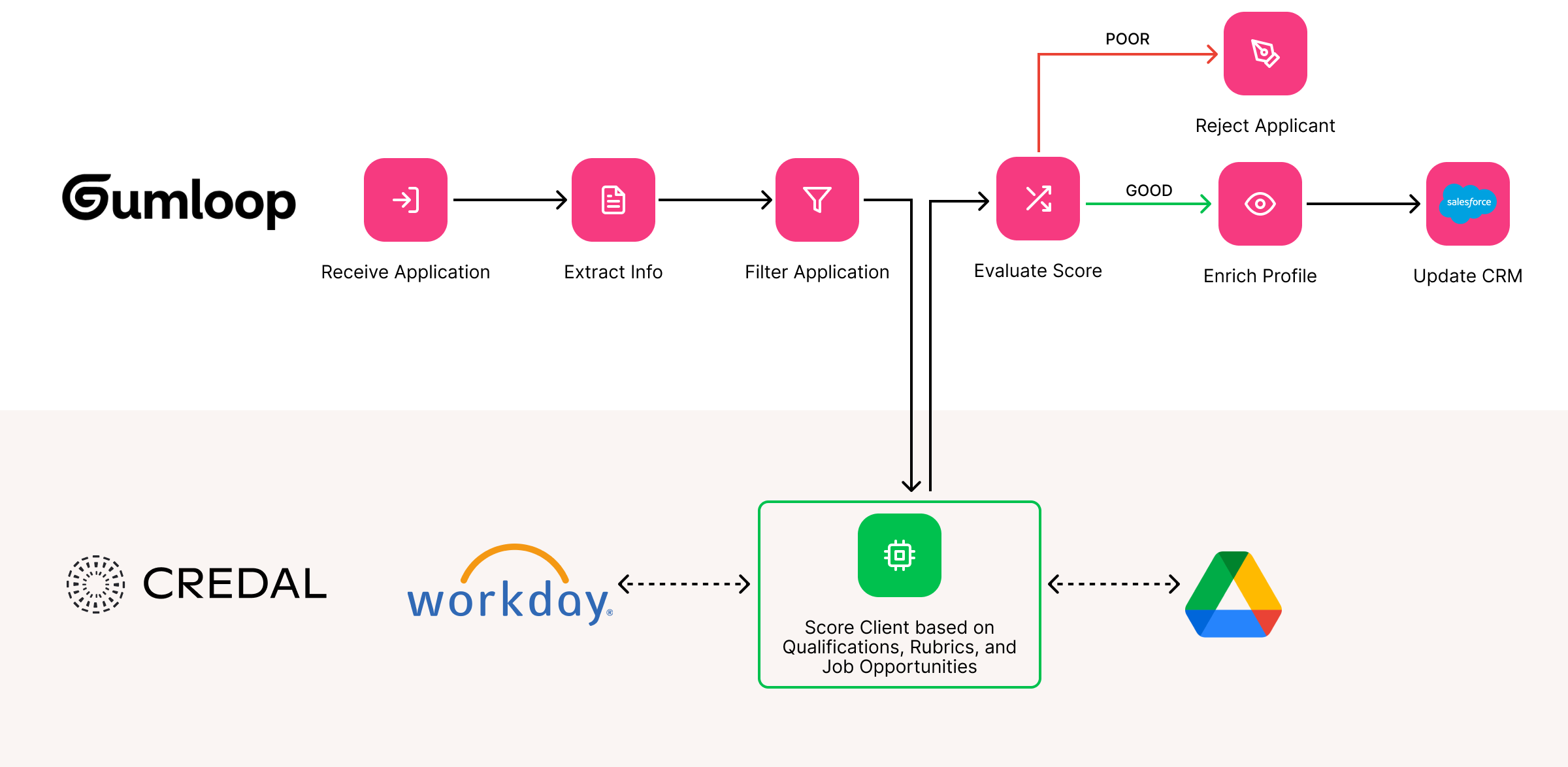
Consider an HR department aiming to automate job application processing. The volume of job applications is high, but each one is critical to the organization’s growth. Using a deterministic platform like Gumloop here is a solid foundation but evaluating applications involves nuanced reasoning, which is where Credal comes into play.
Let’s walk through each of these hypothetical steps:
- Receive Applications (Tool Used: Gumloop) Gumloop monitors the shared HR inbox, pulling attachments from incoming emails (e.g. PDFs, Word documents) and stores them.
- Extract Candidate Information (Tool Used: Gumloop) Gumloop uses an OCR (Optical Character Recognition) module to convert text from submitted applications to structured data. It then parses this data to identify essential candidate details (e.g., name, contact information, skills, experience).
- Filter Applications (Tool Used: Gumloop) Gumloop does an initial pass on applications based on criteria (e.g. years of experience, required skills, location). Applications that do not meet these standards are marked as “Not Qualified” and routed to a rejection workflow. Up to this point, the process relies primarily on straightforward logic and pre-built AI modules like OCR.
- Understand the Candidate’s Qualifications (Tool Used: Gumloop → Credal) After the initial screening, Gumloop sends an API request to Credal for advanced evaluation. Credal’s managed AI agent can analyze resumes and cover letters to assess leadership potential, cultural fit, and technical expertise. The agent might reference the company’s hiring guidelines stored in Google Drive, candidate-relevant documentation in Notion, and team dynamics discussed in Slack. These assessments leverage Credal’s native integrations, which maintain permissions for regulatory compliance.
- Receive Scored Results from Credal (Tools Used: Credal → Gumloop) Credal provides a comprehensive evaluation report, assigning a score to each candidate along with detailed reasoning (e.g. “Candidate exhibits strong leadership skills based on prior project experience.” This scored data is sent back to Gumloop, while the full evaluation is recorded.
- Enrich Data and Make Decisions (Tool Used: Gumloop) Gumloop incorporates the evaluation results from Credal into the workflow. High-scoring candidates are automatically placed in the “Qualified” category and forwarded to the HR team for interview scheduling. Moderate-scoring candidates will require manual review, while those with low scores are directed to the rejection workflow.
- Update CRM and Send Notifications (Tool Used: Gumloop) Gumloop records the current status of each candidate within the company’s CRM system. It also dispatches tailored emails to applicants with updates on status (e.g., interview invitation, rejection, or acknowledgment of further review).
- Feedback Loop: (Tool Used: Gumloop → Credal) Gumloop collects feedback from interviewers for candidates moving forward through an automated survey and sends it to Credal to improve future scoring and evaluations.
In short, Gumloop takes care of repetable, deterministic tasks (eg., parsing resumes, applying filters, updating CRMs) while Credal steps in for the more complicated work (e.g. analyzing qualitative information, making nuanced judgements about candidates).
Closing Thought: Gumloop for the easy problems, Credal for the hard ones
Gumloop is an excellent solution for straightforward tasks. It is intuitive, has pre-built integrations, and shines at workflow-driven problems. It falls short when faced with complex, open-ended situations that require referencing multiple sources an unknown number of times before reaching a conclusion. Fortunately, Gumloop’s integration-forward design allows it to overcome this limitation by linking it to other solutions like Credal.
Credal is a robust platform capable of reasoning, integration with leading AI models, and leveraging context from diverse data sources. The handoff is simple: Gumloop passes a compelx decision to Credal, Credal’s agents reason on it, and then Credal sends the results back to Gumloop to keep the workflow going.
As enterprises face increasingly complex challenges, a growing number of Gumloop users will leverage platforms like Credal to enhance their Gumloop workflows.